single binary · local or remote models · alternate-screen TUI
Agentic coding in the terminal. 2 ms startup.
buildwithnexus (bwn) is a Rust CLI that plans work, edits files, and runs
commands. It works with any model served over the Anthropic Messages, OpenAI chat
completions or native Ollama API. Permission gates decide what it may change, checkpoints
let you undo what its write and edit tools changed, and hooks can block a tool. It ships as
one binary that needs no language runtime. The binary is 4.7 to 6.1 MB, depending on
the platform. The terminal UI re-wraps only the transcript line that changed and draws each frame in one synchronized
update. It also has live autocomplete and diffs that highlight the changed part of each
line. Version 0.14 made it the first
terminal agent to draw images inline in real pixels. Paste a screenshot and it appears
in the transcript before you send it.
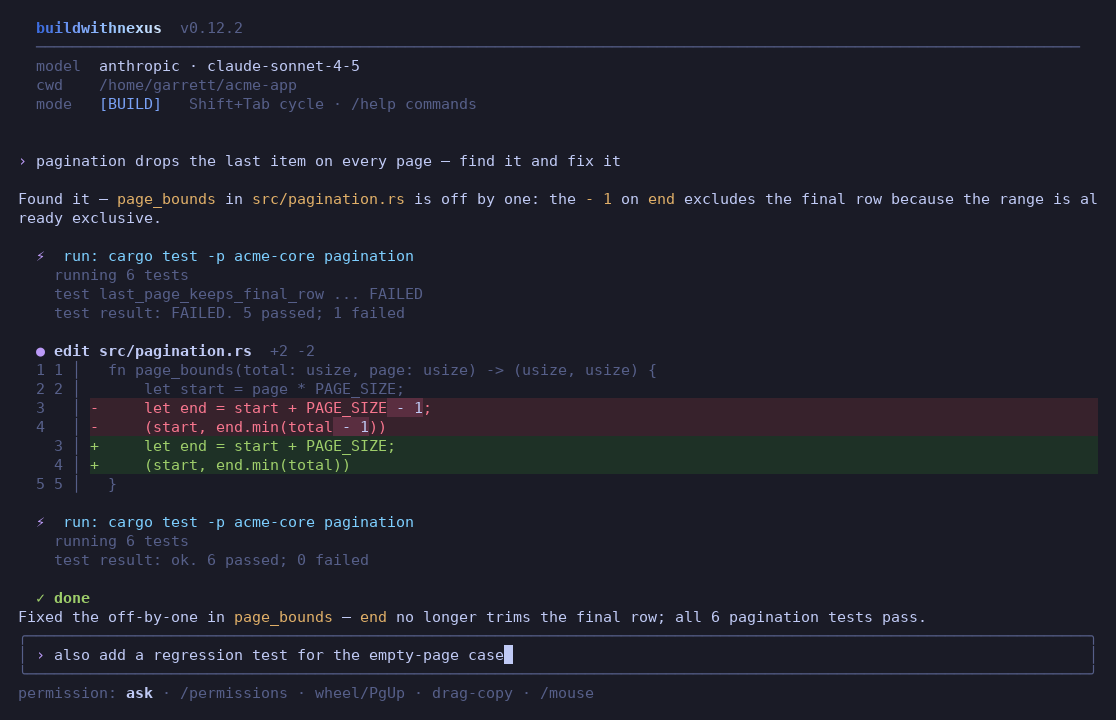
This is a real session in bwn 0.12.7. The diff has a line-number gutter and tinted rows,
and it highlights only the part that changed, which in this session is - 1.
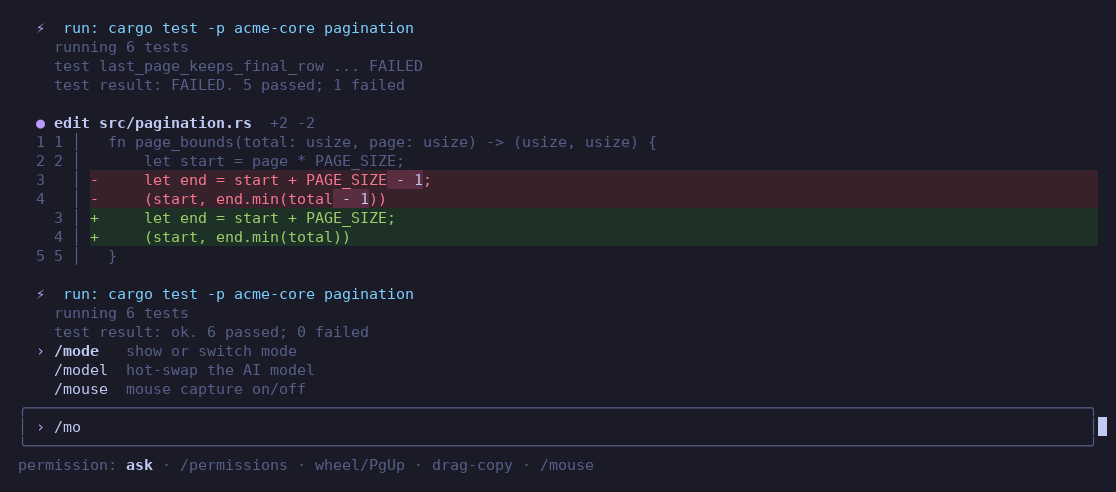
This is the same bwn 0.12.7 session. Type / and a popup lists every command with a one-line description. ↑ and ↓
move through the list, Tab or Enter accepts, and Esc dismisses.
New in 0.15
accept-edits mode. bwn applies file edits inside the project, and inside folders added with --add-dir, without a prompt. Commands, deletions, network access, sensitive paths and changes inside .git still ask. Turn it on with --permission-mode accept-edits or /permissions accept-edits.
Allow, ask and deny rules. Rules such as run_command(git push*) go under permissions in settings.json. Deny beats ask, and ask beats allow. A deny rule refuses in every permission mode, and an ask rule prompts even in auto mode. An allow rule skips the prompt, but readonly mode still refuses every change, and sensitive paths and dangerous commands still ask. Deny and ask rules also match a command run through a wrapper such as sudo or sh -c.
Folder trust covers what a repository runs. A repository's hooks, MCP servers, commands, skills, agent files and allow rules take effect only after you trust the folder. When a trusted hook script changes, bwn asks again before it runs the script.
Helpers that run side by side. Read-only helpers and isolated helpers that the model starts in the same reply run at the same time, up to max_parallel_helpers. The setting defaults to 3 with remote models. Helpers that write in your folder still run one after another.
Editors over the Agent Client Protocol.buildwithnexus acp lets Zed, JetBrains IDEs and Neovim plugins drive bwn. The editor shows the streamed reply, each tool call with its diff, and the approval questions.
Exit codes and a GitHub Action. A headless run's exit code says how it ended. For example, 3 means bwn blocked or refused a change, and 6 means the turn ran out of steps. The repository is also a GitHub Action that runs bwn run or bwn review and can comment on the pull request.
Pictures, PDFs and screenshots.read_file shows a PNG, JPEG, GIF or WebP to a model that takes images, and reads a PDF as text through pdftotext when it is installed. The new screenshot_url tool screenshots a page served on this machine in a local headless Chrome, Chromium or Edge.
› why does the dropdown overlap the header? @"Screenshot 2026-09-23 at 14.02.11.png"
Here's why the overlap happens and the fix.
The dropdown is positioned absolute inside a header that has no stacking context, so it paints above the toolbar. Two lines fix it:
╭─ ⟨ css ⟩ ──────────────────────────────────────────────────────────────────────│ .site-header { position: relative; z-index: 20; }
│ .menu-dropdown { z-index: 10; } /* below the header now */ ╰──────────────────────────────────────────────────────────────────────Element│Before│After ────────────────┼───────────────┼────────────.site-header│ static │z-index: 20.menu-dropdown│z-index: 9999│z-index: 10
toolbar overlap │yes│ none
☑ reproduce at 1280×720
☐ add a Playwright check for the header stack
╭─ ⟨ rust ⟩ ──────────────────────────────────────────────────────────────────────│ #[test]
│fnheader_stays_on_top() {
│let page = Page::open("/")?; // 1280x720 viewport│ assert_eq!(page.z_index(".site-header"), 20);
│ }
╰──────────────────────────────────────────────────────────────────────╭──────────────────────────────────────────────────────────────────────╮│›describe a task · Shift+Tab to change mode│╰──────────────────────────────────────────────────────────────────────╯claude-sonnet-5⠹working· 4s · 212 tok/s · Esc to interrupt
The text is real output of the 0.14 renderer, captured as ANSI and converted to HTML. The
pasted screenshot is an SVG drawing that stands in for the image a terminal draws in real
pixels. The figure also shows syntax-highlighted CSS and Rust blocks in the reply, a pipe
table that follows its :-: and --: alignment markers, task-list
checkboxes, and the live footer.
Inline images
Screenshots and video frames appear inside the transcript as soon as you paste them or drop them onto the terminal. bwn draws them in real pixels with the kitty graphics protocol on kitty and Ghostty, and with Sixel on terminals that support it, such as Windows Terminal 1.22 or later, WezTerm, foot and mlterm. Other truecolor terminals get half-block art. Sixel and half-block previews need ffmpeg. On kitty and Ghostty, a PNG draws without ffmpeg, but other images and video frames need it.
Code rendering
Syntax highlighting covers 20+ languages, and Markdown tables stay aligned. Diffs highlight the changed part of each line, and file paths are clickable.
Plan, build, brainstorm
Shift+Tab cycles through three modes. PLAN breaks the task into steps for you to approve, BUILD runs the agentic ReAct loop, and BRAINSTORM is a chat in which the agent can use read-only tools and never writes.
Local models
bwn uses Ollama's native API and detects each model's context window. It also recovers tool calls that small coder models write as tagged text.
Permissions and checkpoints
Permission gates run in ask, accept-edits, auto or readonly mode. Sensitive paths such as .env and ~/.ssh need your confirmation even in auto mode. Checkpoints let you undo what the agent's write, edit, move and delete tools changed in text files up to 2 MiB. They do not cover changes made by shell commands, apply_patch or str_replace_editor.
MCP, skills, AGENTS.md
bwn is a full MCP client over stdio and HTTP. It loads Agent Skills folders and reads the same AGENTS.md and CLAUDE.md instruction files as other agents. The terminal UI asks before it uses a repository's own instruction files, and a repository's skills load only after you trust the folder.
Hooks
Hooks run your own commands at the same lifecycle points as Claude Code. A project hook can deny a tool but never grant one.
Sessions and workflows
Resume any session, queue background workflows with /schedule and /loop, and add a note to your next message with /btw.
One binary
Each release binary is 4.7 to 6.1 MB, depending on the platform, and needs no language runtime. It has 10 direct crate dependencies, plus the libc crate on Linux and macOS. The Linux binaries need glibc 2.34 or later. On the first run in a terminal, the npm launcher downloads the binary for your platform and verifies its SHA-256 checksum. Without a terminal, as in CI, pass --bootstrap or set BWN_ALLOW_BOOTSTRAP=1 to allow the download. Each release binary carries a build-provenance attestation.