Multimodal input
Paste or drop a screenshot, photo, or video clip, and bwn attaches it to your prompt. There is no separate upload step and no special syntax to type.
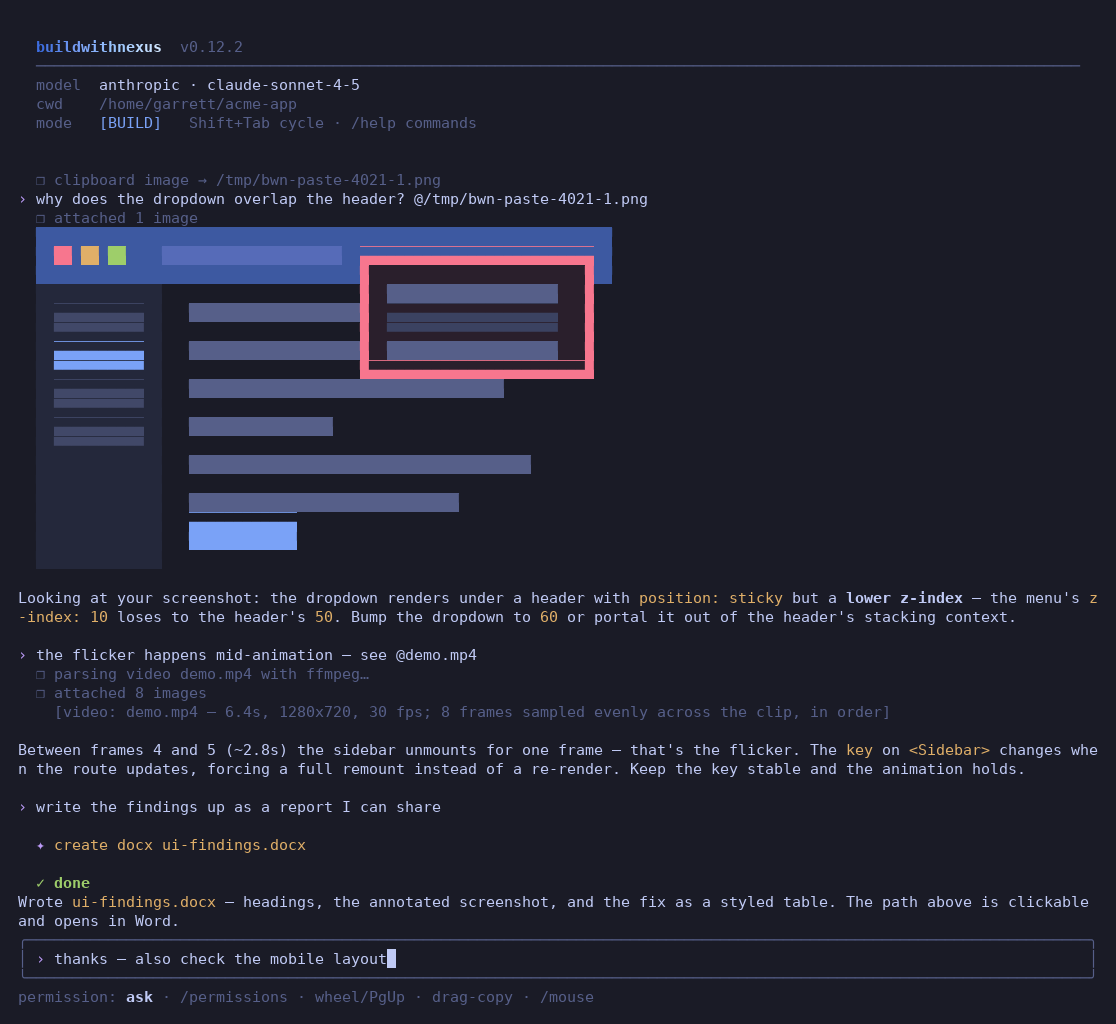
@demo.mp4 attachment into frames with
ffmpeg and adds the clip's duration, resolution and fps. The agent writes the findings to a
.docx.Paste an image
Ctrl+V reads the image on your system clipboard, saves it to a temp
file, and attaches it as an @attachment token. bwn reads the clipboard with wl-paste on
Wayland, xclip on X11, pngpaste or AppleScript on macOS, and PowerShell on Windows and WSL. If
the clipboard holds text, Ctrl+V inserts the text at the cursor
instead.
Drop a file
Drag a screenshot from Finder, Explorer or your file manager onto the terminal, or paste its
path. Quoted paths, file:// URLs, ~/ paths and shell-escaped paths all
work. The file becomes an @attachment token, and bwn quotes the path if it contains
spaces. The preview appears at once, even while the agent is busy.
See what you attached
Attached images render inside the transcript, before you send them, so you can confirm the right screenshot goes to the model without leaving the terminal:
| Terminal | What you see |
|---|---|
| kitty 0.28 or later, or Ghostty | The real pixels as a thumbnail. bwn uploads the PNG once through the kitty graphics protocol as a virtual placement. The transcript rows are Unicode placeholder cells, so the image scrolls with the text, stays intact when the screen repaints, and works through tmux with allow-passthrough on. bwn frees the uploads on /clear and on exit. bwn picks this tier on its own only in kitty and Ghostty. For another terminal that supports kitty's Unicode placeholders, set "images": "kitty". |
Sixel terminals: Windows Terminal 1.22 or later (native Windows and WSL), WezTerm, foot, mlterm, xterm -ti vt340 | The real pixels as a thumbnail. bwn asks the terminal at startup whether it supports Sixel and how many pixels a cell is. It uses the cell size to scale the image and to work out how many text rows the image covers, and it reserves that many rows. This tier needs ffmpeg. To force it, set "images": "sixel" or BWN_IMAGES=sixel. |
| Any other truecolor terminal, such as iTerm2, Alacritty, older Windows Terminal or VS Code | Half-block art. bwn uses ffmpeg to decode the image. Install ffmpeg with sudo apt-get install ffmpeg, brew install ffmpeg or winget install ffmpeg. |
NO_COLOR or a non-truecolor terminal | bwn draws no preview, so the terminal never shows garbled output. |
Line mode (--plain) | Half-block art in any truecolor terminal, kitty and Ghostty included. Line mode has no alternate screen, so bwn skips the kitty tier. It also does not ask the terminal about Sixel, so Sixel previews appear only with "images": "sixel" or BWN_IMAGES=sixel. bwn draws each preview once and does not refit it when you resize the window. With TERM=dumb, which also selects line mode, bwn draws no preview. |
| Size of Sixel and half-block previews | At most half the terminal width, capped at 80 columns, and a third of its height, capped at 16 rows. The preview keeps the image's proportions and refits when you resize the window. If an image is partly scrolled out of view, bwn draws only the part still in view. The model always gets the full-size image. |
In kitty and Ghostty, bwn sends a PNG to the terminal as it is, so a pasted screenshot needs
no ffmpeg there. bwn converts JPEG, WebP, GIF and a video's first frame with ffmpeg when it is
installed, and shrinks a PNG wider than 1600 pixels the same way. The Sixel and half-block tiers
decode every image with ffmpeg. The
"images": "auto" | "kitty" | "sixel" | "blocks" | "off" setting picks the tier, and
auto is the default. While the setting is auto, you can pick the tier for
one run with BWN_IMAGES=kitty, BWN_IMAGES=sixel or
BWN_IMAGES=blocks. To turn previews off, set
"images": "off". If bwn already previewed a screenshot at paste time, it does not draw
it again when you submit.
Attach files
> why does the header overlap? @screenshot.png
> summarize what happens in @demo.mp4
Bare image and video paths work without the @ too. Supported image formats are
png, jpg, jpeg, gif and webp. bwn does not send an image over 5 MB. It prints a warning with an
ffmpeg command that makes a smaller copy. bwn attaches at most 256 KiB of a text file. For a
larger file, it attaches the first 256 KiB, adds a [truncated: …] line that gives the
file's full size, and prints a warning line.
Video via ffmpeg
bwn reads video attachments with ffprobe and samples them with
ffmpeg. Supported formats are mp4, mov, webm, mkv, avi, m4v, mpg, mpeg and gifv. bwn
attaches up to 8 evenly spaced frames in order, each scaled to at most 768 pixels wide. A metadata block
gives the model the clip's duration, resolution and fps, and says the frames are evenly spaced
and in order. This needs ffmpeg and ffprobe on your PATH.
Ask for a Word document
Ask for a report as a Word document and the agent writes a .docx file with the built-in
create_docx tool. The path in the ✦ create docx line is an
OSC 8
file:// hyperlink. In terminals that support OSC 8, such as iTerm2, WezTerm, kitty,
Windows Terminal and GNOME Terminal, clicking the path opens the document in Word or in your
default app for .docx files. In line mode (--plain), or with
NO_COLOR set, bwn prints the path as plain text.
Images work in every mode
An attached image goes to the model in every mode. That covers a quick question and the
PLAN, BRAINSTORM and BUILD modes. It also covers the /plan, /build and
/brainstorm commands, and headless bwn run, bwn plan and
bwn brainstorm. When you
approve a plan, bwn passes its images to the build that carries it out.
> what is in @screenshot.png?
bwn brainstorm "why does this layout break? @mobile.png"
Pictures, PDFs and screenshots the agent reads
New in 0.15. When the agent calls read_file on a PNG, JPEG, GIF
or WebP of 5 MB or less, the model sees the image. On a PDF, read_file returns the
text that pdftotext from poppler extracts. Without pdftotext, the result
names the package to install. A scanned PDF with no text layer returns a note that there is no
text to read.
The screenshot_url tool opens a page served on this machine, such as
http://localhost:3000, in a local headless Chrome, Chromium or Edge. The model sees a
1280×800 image of the page unless it asks for another size. bwn uses the browser that
BWN_CHROME names when it is set. Otherwise it looks on PATH, in the usual install
folders and for a Playwright build. bwn blocks every request the page makes to another host. To
screenshot a page on another host, add that host to network.allow.
A text-only model gets no image from read_file, and the tool result tells it
why. bwn does not offer screenshot_url to a text-only model. In BUILD, a model with
a context window under 32,768 tokens gets the compact tool set, which leaves out
screenshot_url. PLAN, BRAINSTORM and the readonly permission mode
offer it at any window size. To offer it in BUILD, set context_tokens in
settings.json to the model's real window.
Text-only models
bwn sends image and video attachments only to models that accept images. With a text-only
model, bwn prints a warning such as
⚠ this model does not accept images (Ollama reports no vision) — image not attached
instead of dropping your screenshot without telling you. The reason in parentheses names the
"vision" setting, the server's report, or the lack of any sign that the model accepts
images. If bwn has it wrong, set "vision": true in settings.json.
Models & providers explains how bwn decides which models accept
images.