The TUI
The TUI fills the terminal's alternate screen. When a chunk streams in, bwn re-wraps only the transcript line it changes. Repaints use synchronized output, so terminals that support it draw each one as a single frame. The composer has a border and stays on screen. On launch, the composer and footer paint first, so you never see a black screen.
With --plain, or when TERM is dumb, bwn runs in line
mode instead. It does not switch to the alternate screen, prints the transcript line by line, and
shows no footer, spinner or popup. Its input line takes Esc, Ctrl+C,
Ctrl+D, Shift+Tab, and ↑/↓ for
history. The rest of this page describes the full-screen TUI.
Diffs
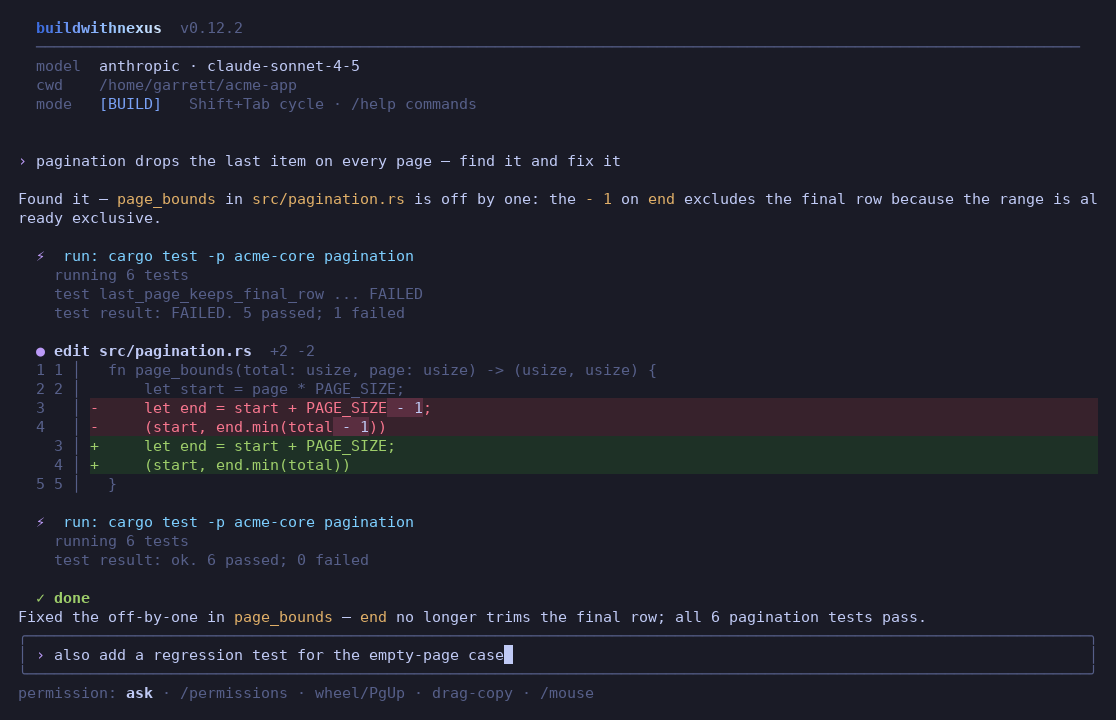
bwn draws every edit with a gutter of old and new line numbers, added rows in green and removed rows in red, and the changed span highlighted within each line. The dark and light themes also tint the background of added and removed rows. The ansi theme keeps the terminal's own background there. Each diff appears once. When bwn applies a change, it prints an edit header with the path and the added and removed counts. When bwn asks before a change, the diff appears above the approval question, and bwn prints nothing under the edit header. Otherwise the diff appears under it. A diff shows up to 40 lines, and a new file shows its first 20. File paths in edit headers are OSC 8 links, so clicking one opens the file in your default app.
The theme setting picks dark, light or
ansi. Its default, auto, picks light on a light terminal background and
dark otherwise. /theme switches the theme and saves your choice.
Autocomplete
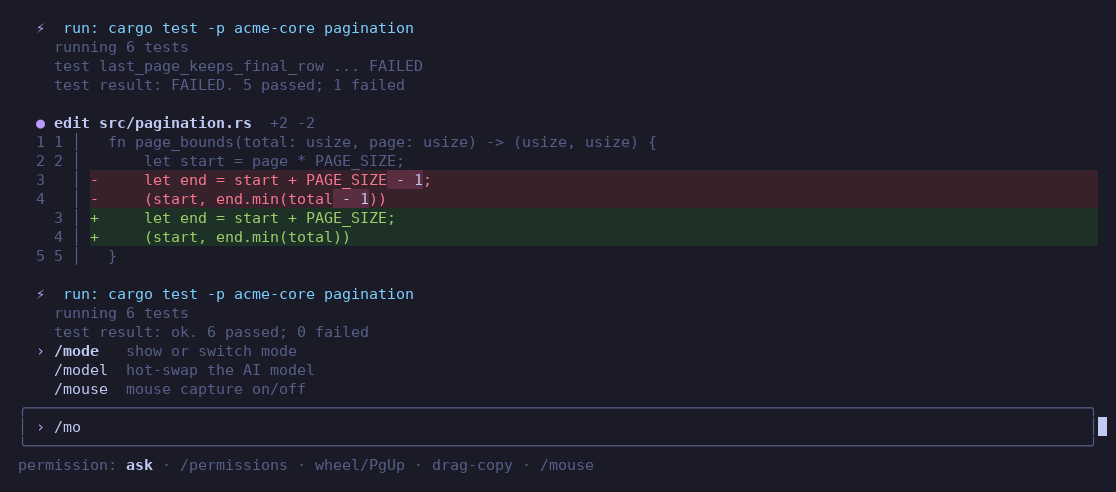
Typing / opens a popup that lists every command with a description and narrows
the list with each keystroke. @ completes file paths, and @kb: and
@symbol: query the project knowledge base.
Inline images
Paste a screenshot with Ctrl+V or drop a file onto the terminal, and
bwn draws the image in the transcript before you send it. When you type a path such as
@shot.png, bwn draws the image when it attaches the file to the prompt you send.
On kitty and Ghostty, the image appears with its real pixels. bwn uploads it once as a PNG
through the kitty graphics protocol, and the transcript rows hold placeholder cells. The image
therefore scrolls, wraps and repaints the same way text does. This tier reads PNG files directly
and needs ffmpeg only for other formats. Inside tmux, this works when your tmux config has
set -g allow-passthrough on. bwn deletes the uploaded image from the terminal when
you exit. When bwn starts, it asks the terminal whether it supports Sixel. Terminals that do,
such as Windows Terminal 1.22 or later, WezTerm, foot and mlterm, also get real pixels. bwn
decodes the image with ffmpeg and draws it over Sixel. On every other truecolor terminal, bwn
decodes the image with ffmpeg and draws it as half-block art. In every tier the image takes at
most half the window's width, up to 80 columns, and a third of the rows above the composer, up
to 16 rows. In the kitty and Sixel tiers, bwn never draws the image larger than its native size.
To override the detection, set the images settings key to
auto, kitty, sixel, blocks or off, or set
BWN_IMAGES.
Code and tables
A zero-dependency lexer highlights fenced code blocks in Rust, C/C++, JavaScript/TypeScript,
Python, Go, Java/Kotlin/Swift, shell, Ruby/PHP/Lua, SQL, JSON, YAML, TOML, CSS, HTML and diffs.
It runs once, when the closing fence arrives, and never per streamed token. bwn collects pipe
tables as they stream in and draws each one as a single aligned block. The block has a bold
header and a ─┼─ rule. Columns follow the :--, :-: and
--: alignment markers and shrink with … instead of wrapping. ---
rules, #### headings, - [ ] task lists and
~~strikethrough~~ render too.
Footer and notifications
The footer always names the model. When the agent is idle, the footer also names the
permission mode. While the agent works, the footer replaces the permission mode with a spinner,
the elapsed time, an estimate of streamed tokens per second, and a hint that Esc
interrupts. Windows Terminal, Ghostty and ConEmu also show a progress state on the taskbar. While
the window is unfocused, bwn sends a desktop notification when a turn of eight seconds or more
ends, and when it waits for you at an approval or a question. bwn sends
each one over OSC 99 and OSC 777, adds OSC 9 on iTerm2, WezTerm and Windows Terminal, and rings
the bell. Set "notify": "always" or "off" to change that. If you
scroll back to read earlier output, the view does not move when new output streams in.
Multimodal
@demo.mp4, and the agent writing a .docx report.Ctrl+V pastes a clipboard screenshot and draws it inline as you paste.
When you send the prompt, bwn attaches the picture to it. If the model takes no images or the
picture is over 5 MB, bwn prints a warning and sends the prompt without the picture.
@clip.mp4 attaches a video as frames that ffmpeg
samples. Paths to generated .docx files open in your default app, such as Word, when
you click them. See
Multimodal input for details.
Keys
| Key | Action |
|---|---|
| Esc | While the agent works, interrupt it and keep your draft. When idle, dismiss the popup if one is open. Otherwise clear the draft, or in vim mode return to NORMAL without clearing it. On an empty draft, a second Esc within one second opens /rewind. In vim mode, both presses must happen in NORMAL, so from INSERT it takes a third press. |
| Ctrl+C | While the agent works, interrupt it, clear your draft and clear the messages you queued during the turn. When idle, clear the draft. On an empty draft, a second press within two seconds quits. Ctrl+D on an empty draft quits at once. |
| Shift+Tab | Cycle through PLAN, BUILD and BRAINSTORM, in that order. Your draft, its continuation lines, and the cursor stay where they are. |
| Tab | Accept the autocomplete suggestion. It replaces the whole token, even when the cursor is in the middle of a word. |
| ↑/↓ | Step through the history entries that start with what you have typed, without losing your draft |
| Ctrl+V | Paste text or a clipboard image. An image previews inline as soon as you paste it. |
| drop a file | A dragged or pasted image or video path becomes an @attachment token and previews inline |
| Ctrl+R | Search history for a substring, newest entries first |
| Ctrl+G | Edit the prompt in $VISUAL or $EDITOR. bwn submits a multi-line result as one multi-line prompt. |
| Ctrl/Alt+←→ | Jump by word |
| PgUp/PgDn | Scroll the transcript |
| double or triple click | Select a word or a line and copy it over OSC 52. The footer briefly shows how many characters bwn copied. Terminals that drop OSC 52 get a one-time notice instead. Selection lines up with the characters on screen, including CJK characters, emoji, and combining marks. |
/vim turns vim-style modal editing on or off. The cursor shape shows whether you
are in NORMAL, INSERT or VISUAL mode.